Transforme as Contagens da sua Prancheta em Planilhas do Excel
Converta suas auditorias de inventário físico em segundos. Tire uma foto de suas folhas de estoque manuscritas e nossa IA extrairá as SKUs, os nomes dos itens e as quantidades diretamente em um arquivo .xlsx formatado.
Fazer Upload da Lista de Inventário Manuscrita
Suporta fotos de pranchetas, contagens de estoque e folhas de apontamento. Extrairemos os dados para uma grade editável do Excel.
InventoryToExcel.tool_upload_hint
SKUs e Quantidades em colunas separadas
Treinado em letras confusas e apressadas
Pronto para upload no seu sistema POS
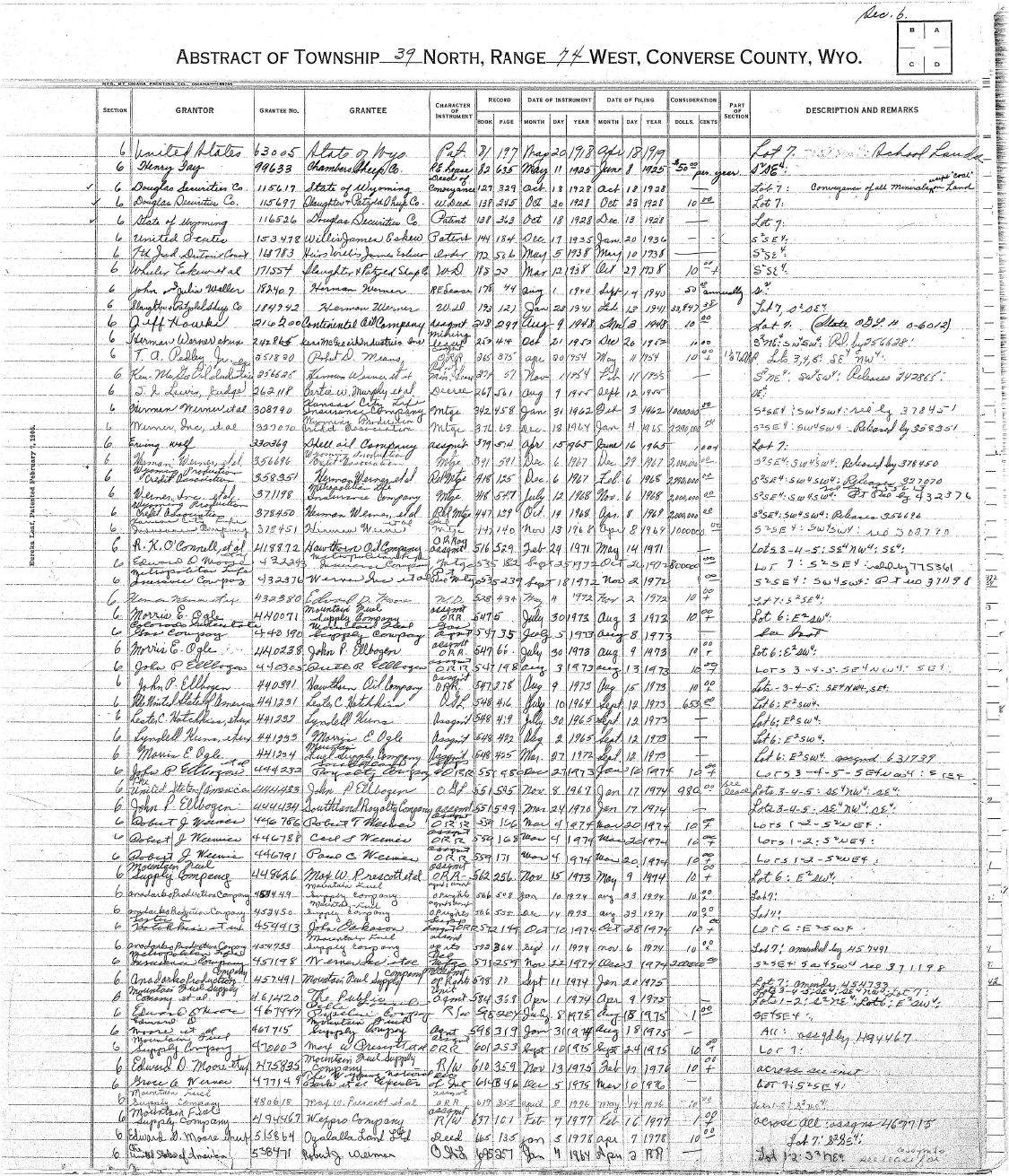
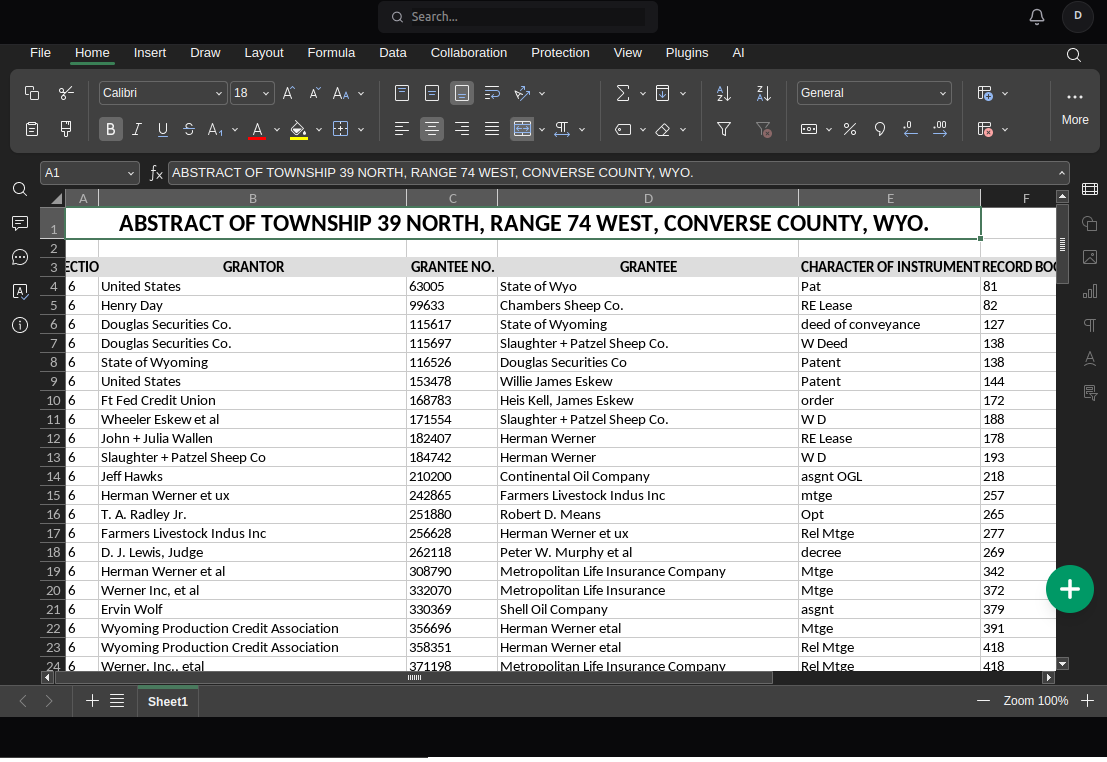
Da Prancheta Física ao Rastreador Digital
Veja como convertemos registros de depósito desordenados em linhas estruturadas do Excel.
Quem Automatiza o Inventário com o NoteOCR?
Feito para empresas que realizam auditorias físicas de estoque.
Gerentes de Armazém
Converta registros de depósito manuscritos com várias páginas e contagens rotativas em Excel instantaneamente, mantendo sua cadeia de suprimentos em movimento.
Proprietários de Lojas de Varejo
Tire fotos de suas contagens de estoque de varejo no final do mês e faça o upload para atualizar seu sistema POS (Ponto de Venda) ou loja da Shopify via CSV.
Equipe de Restaurantes e Bares
Pare de redigitar o inventário semanal de alimentos e bebidas. Digitalize as pranchetas da sua cozinha diretamente nas suas planilhas de custo de alimentos.
Rastreamento de Equipamentos
Converta facilmente folhas de saída manuscritas, registros de ferramentas e rastreadores de ativos trazidos de campo em bancos de dados digitais pesquisáveis.
Contagem de Estoque: Manual vs. NoteOCR
Por que a entrada manual de dados de estoque está custando dinheiro ao seu negócio.
| Método | Tempo por Página | Precisão das SKUs | Custo |
|---|---|---|---|
| Digitação Manual | 15-30 minutos | Propenso a erros humanos | $20/hora de trabalho |
| Scanners Móveis Padrão | 2 minutos | Produz imagens planas | Grátis |
| IA de Inventário NoteOCR | 20 segundos | Formata dados em linhas | Teste Grátis |
Construído para a Letra Bagunçada de Depósitos
Sabemos que as contagens de inventário físico são apressadas. Nossa IA se adapta a isso.
Reconhecimento de SKU Alfanumérico
Os códigos de itens são misturas complexas de letras e números. Nossas redes neurais são treinadas para distinguir um '0' de um 'O' e um '1' de um 'l' em SKUs manuscritas.
Formatação de Colunas
Se você desenhou linhas no papel ou apenas deixou espaços, o NoteOCR separa os Nomes dos Itens, SKUs e Quantidades em suas próprias colunas distintas do Excel.
Exportar como CSV para Sistemas POS
Faça o download dos seus dados em um arquivo Excel ou exporte como um CSV para enviar de forma contínua as contagens de estoque atualizadas para o Shopify, Square ou Tiny ERP.
Como Processamos as Folhas de Estoque Físicas
As planilhas de inventário são notórias pela má caligrafia e pela tinta borrada. O NoteOCR utiliza o Reconhecimento Estrutural de Tabelas (TSR) especializado para reconstruir a grade da sua prancheta.
O que a Nossa IA Extrai
- Números de série longos e SKUs
- Quantidades, pesos e medidas
- Itens riscados e correções
- Layouts de pranchetas de várias colunas
- Datas, locais e números de corredores
Dicas para Auditorias Mais Rápidas
- Garanta que a iluminação do depósito esteja brilhante ao fotografar
- Escreva as SKUs da forma mais clara possível
- Mantenha as colunas um pouco alinhadas no papel em branco
- Tire fotos da prancheta diretamente de cima
- Revise as quantidades finais do Excel em comparação com suas prateleiras
Outras Ferramentas de Dados Comerciais
Perguntas Frequentes sobre OCR de Inventário
1. Como eu converto uma folha de inventário manuscrita para o Excel?
Tire uma foto da sua prancheta ou folha de estoque, certificando-se de que a caligrafia esteja em foco. Faça o upload da foto para o NoteOCR e nossa IA detectará as colunas, lerá as SKUs e as quantidades e fornecerá um arquivo Excel para download.
2. Ele consegue ler a caligrafia apressada do pessoal do depósito?
Sim. A nossa IA foi treinada especificamente para ler a escrita manuscrita desordenada e apressada. Embora uma escrita extremamente descuidada possa exigir pequenas correções manuais no Excel, o NoteOCR lida com a escrita típica de campo melhor do que qualquer scanner de texto padrão.
3. Ele reconhece as SKUs complexas e os números de série com precisão?
Sim, o nosso mecanismo é altamente capaz de ler sequências alfanuméricas. Ele usa IA contextual para diferenciar entre caracteres parecidos, como o número zero '0' e a letra 'O', dentro das SKUs.
4. Posso importar isso para o Shopify, Square ou meu PDV?
Com certeza. O NoteOCR permite baixar sua contagem de estoque como um arquivo .xlsx. Você pode simplesmente abrir este arquivo e salvá-lo como um .CSV, que é o formato universal aceito por quase todos os sistemas de gerenciamento de estoque e POS (Ponto de Venda).
5. E se nós apenas escrevermos o inventário em papel em branco sem linhas de grade?
Nosso sistema detecta tabelas 'implícitas'. Mesmo se você não tiver desenhado linhas no papel, desde que tenha deixado espaço entre o nome do item e a quantidade, a IA os colocará automaticamente em colunas separadas no Excel.
6. Pode contar marcas de contagem (tracinhos ou pontuações)?
Atualmente, o NoteOCR lê os números escritos (por exemplo, '14' ou 'Quatorze'). Se a sua equipe usa marcas de contagem (||||), recomendamos que eles escrevam o total numérico final ao lado das marcas antes de fotografar a página para obter os melhores resultados.
7. Como faço para processar uma auditoria de inventário de 20 páginas?
Para usuários individuais, você pode processar cada página uma a uma e colar os resultados em um arquivo mestre do Excel. Se a sua empresa processa regularmente auditorias massivas, entre em contato conosco para obter acesso à API ou soluções de processamento em lote.
8. O conversor de inventário para Excel é gratuito?
Você pode experimentar a ferramenta gratuitamente para verificar a precisão em suas planilhas de inventário específicas. Para uso contínuo em sua empresa, oferecemos pacotes profissionais projetados para processamento de alto volume.
9. Os dados de inventário da minha empresa são mantidos privados?
Sim. Operamos com protocolos rígidos de privacidade. Suas folhas de estoque são enviadas por meio de criptografia SSL, processadas pela IA e permanentemente excluídas de nossos servidores logo em seguida. Não retemos seus dados proprietários.
10. O que acontece se uma quantidade de item estiver rasurada e corrigida?
Nosso OCR é treinado para reconhecer rabiscos e rasuras. Na maioria dos casos, ele ignorará o número riscado e extrairá apenas a quantidade recém-escrita ao lado dele. Recomendamos sempre fazer uma rápida revisão visual do arquivo no Excel.
Pare de Digitar as Suas Contagens de Estoque.
Tire uma foto da sua prancheta e deixe o NoteOCR construir a sua planilha.
Converter Inventário Agora