JPGを瞬時にWordドキュメントに変換
画像からテキストを手入力するのはやめましょう。JPG、JPEG、または写真をアップロードするだけで、当社の高度なAIが正確にテキストを抽出し、完全に編集可能なMicrosoft Word (.docx) ファイルを作成します。
JPG画像をアップロード
標準的な写真、スクリーンショット、スキャンした画像をサポートしています。テキストを抽出し、フォーマットされたWordドキュメントを提供します。
JpgToWord.tool_upload_hint
テキストは画像として貼り付けられるのではなく、抽出されます
段落と改行が保持されます
MS Word、Google Docs、Pagesで開けます
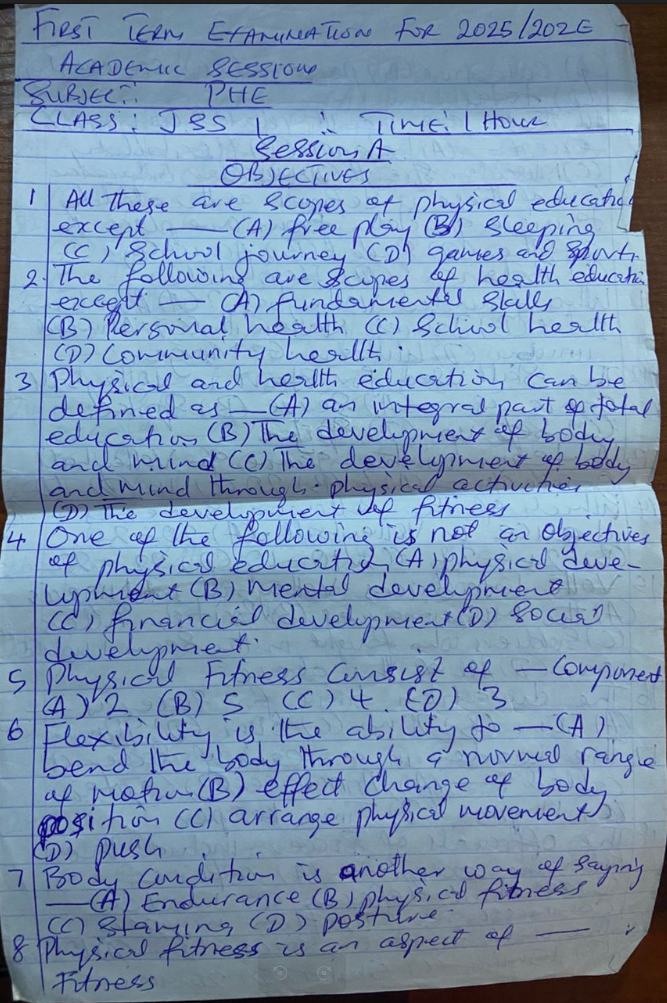
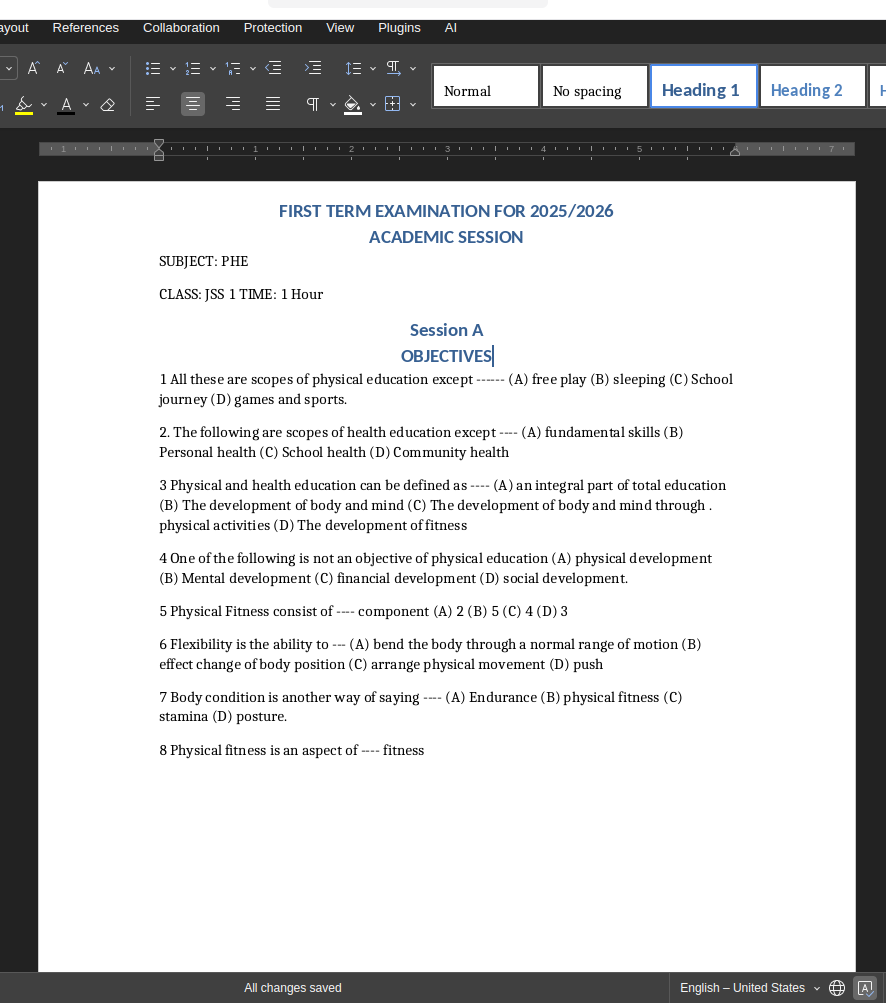
フラットな画像から編集可能なテキストへ
JPGに固定されたテキストを編集可能なフォーマットに完璧に抽出する様子をご覧ください。
JPGをWordに変換する理由
画像に閉じ込められたテキストを完全に編集可能にする最も簡単な方法。
スキャンしたドキュメント
契約書、請求書、公式な手紙のスキャンJPEGを、段落やレイアウトを維持したまま編集可能なテキストに変換します。
スクリーンショットとウェブスニペット
ウェブサイト、制限付きPDF、またはアプリのJPGスクリーンショットを、Wordですぐにコピー、編集、フォーマットできるテキストに変換します。
印刷されたページの写真
本、マニュアル、雑誌の写真を撮りましたか?一文字も入力することなく、テキストを正確に抽出します。
手書きの画像
基本的なコンバーターとは異なり、当社のエンジンは手書きのメモやホワイトボードの内容を含むJPG写真も読み取って変換できます。
JPGからWordへ: 他のファイル変換ツールが失敗する理由
ほとんどのツールは画像をWordファイルに貼り付けるだけです。NoteOCRは実際にテキストを抽出します。
| 方法 | 時間 | テキスト抽出 | コスト |
|---|---|---|---|
| 手動入力 | 15〜30分 | 高い (ただし面倒) | あなたの時間 |
| 標準的なファイル変換ツール | 1分 | 0% (画像を貼り付けるだけ) | 多くが有料 |
| NoteOCR (AI抽出) | 15秒 | 98%+ の編集可能なテキスト | 無料トライアル |
高度なJPGテキスト抽出
画像ファイルから正確なテキストを抽出するために特別に構築されています。
JPGおよびJPEG形式に対応
ファイルの拡張子が .jpg でも .jpeg でも、当社のシステムは標準的なウェブ画像、スマホ写真、高解像度のカメラ撮影画像を完璧に処理します。
レイアウトと段落の維持
プレーンテキストを吐き出すだけではありません。当社のOCRは改行、段落、リスト構造を検出するため、ダウンロードしたWordドキュメントは元の画像に近い見た目になります。
多言語対応
日本語、英語、スペイン語、フランス語、ドイツ語など、数十の言語のJPEGから特殊な文字認識を用いてテキストを抽出します。
当社の画像からWordへのエンジンが機能する仕組み
JPGファイルを編集可能なWordドキュメントに変換するには、光学文字認識(OCR)が必要です。NoteOCRは画像のピクセルを分析し、個々の文字や単語を特定し、ドキュメント構造をマッピングして、すぐに編集できるネイティブのMicrosoft Wordファイルを生成します。
エンジンが処理するもの
- 標準的な印刷テキストとタイポグラフィ
- 画像内の筆記体や手書きのテキスト
- 段落のスペースと改行
- 画像のコントラスト調整と背景ノイズの除去
- 自動方向補正
最適な変換のためのヒント
- 画像がぼやけていないことを確認する
- テキストに濃い影がかからないようにする
- テキストをカメラと平行に保つ
- 高解像度のJPEGを使用すると良い結果が得られます
- 可能であれば、不要な背景を切り取る
その他の変換ツール
JPGからWordへの変換に関するよくある質問
1. JPGをWordに変換するにはどうすればよいですか?
アップロードボタンをクリックして、JPGまたはJPEG画像を選択するだけです。当社のAIが自動的に画像をスキャンし、光学文字認識(OCR)を使用してテキストを抽出し、ダウンロード可能なMicrosoft Word(.docx)ドキュメントを数秒で提供します。
2. JPGとJPEGに違いはありますか?
いいえ、ファイル拡張子が異なるだけで、全く同じ画像形式です。当社のコンバーターは、.jpgと.jpegの両方のファイルをシームレスにサポートしています。
3. Wordドキュメントは実際に編集できますか?
はい!画像を空白のWordページに貼り付けるだけの基本的なファイル変換ツールとは異なり、NoteOCRは実際の文字を抽出します。通常のドキュメントと同じように、テキストの削除、編集、ハイライト、フォントの変更が可能です。
4. 元のフォーマットは保持されますか?
当社のエンジンは、段落、改行、基本的なリストなどの標準的なレイアウト構造を保持するように設計されています。ただし、画像からの非常に複雑なグラフィックレイアウトは、ダウンロード後にWordで微調整が必要になる場合があります。
5. このツールはMacやモバイルデバイスで機能しますか?
はい。NoteOCRは完全にブラウザベースであるため、Windows、Mac、iOS (iPhone)、AndroidでJPGをWordに変換できます。ソフトウェアのインストールは必要ありません。
6. JPGに印刷されたテキストではなく手書き文字が含まれている場合はどうなりますか?
それは当社の専門分野です。JPGが手書きのメモやホワイトボードの写真である場合、当社の高度なAIが手書き文字を読み取り、Wordドキュメント内の標準的な編集可能なデジタルテキストに変換します。
7. このJPGからWordへのコンバーターは無料で使用できますか?
画像からテキストへの抽出精度をテストできるように、無料トライアルを提供しています。画像の大量バッチを処理する必要がある場合は、定期購読なしのシンプルな買い切り(一回払い)オプションを提供しています。
8. 変換されたファイルをGoogle Docsで開くことはできますか?
はい。このツールは標準の .docx ファイルを出力します。このファイルをGoogleドライブに直接ドラッグアンドドロップし、Google Docsで開いて完璧に編集することができます。
9. アップロードした画像は安全ですか?
もちろんです。すべてのファイルは、安全な暗号化されたSSL接続を介してアップロードされます。当社はお客様のファイルの所有権を主張せず、アップロードされたすべてのJPGおよび変換されたWordドキュメントは、処理後すぐにサーバーから完全に削除されます。
10. 画像がぼやけていたり、低品質だったりした場合はどうなりますか?
当社のAIは、ノイズを処理し、コントラストを自動的に向上させるように構築されています。ただし、人間の目にも全く読めないテキストの場合、OCRでの認識は困難になります。最良の結果を得るには、テキストに焦点が合っている、明るく鮮明な画像を使用してください。