Convert Cursive Writing to Text in Seconds.
Upload a photo of any cursive handwriting notes, letters, journals, forms. Our AI decodes connected script and flowing loops that generic OCR tools can't touch. No app. No signup. Results in under 30 seconds.
CursiveToTextPage.tool_upload_title
CursiveToTextPage.tool_upload_desc
Runs in your browser. No download, no signup required to try.
Built for cursive , not adapted from a print OCR engine.
Get your converted text in the format you actually need.
Cursive Handwriting In. Clean Digital Text Out.
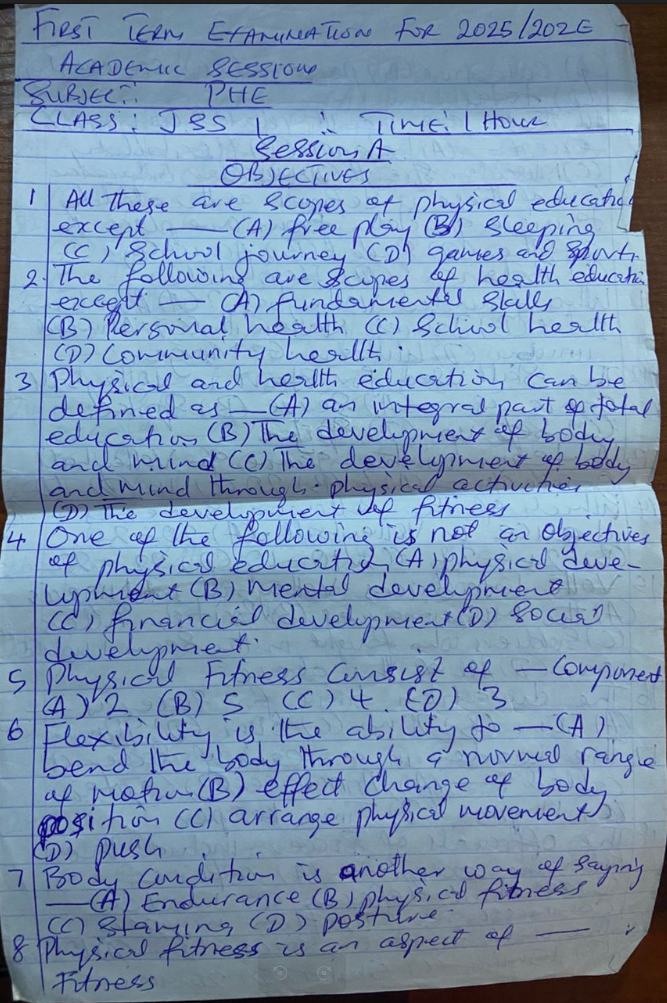
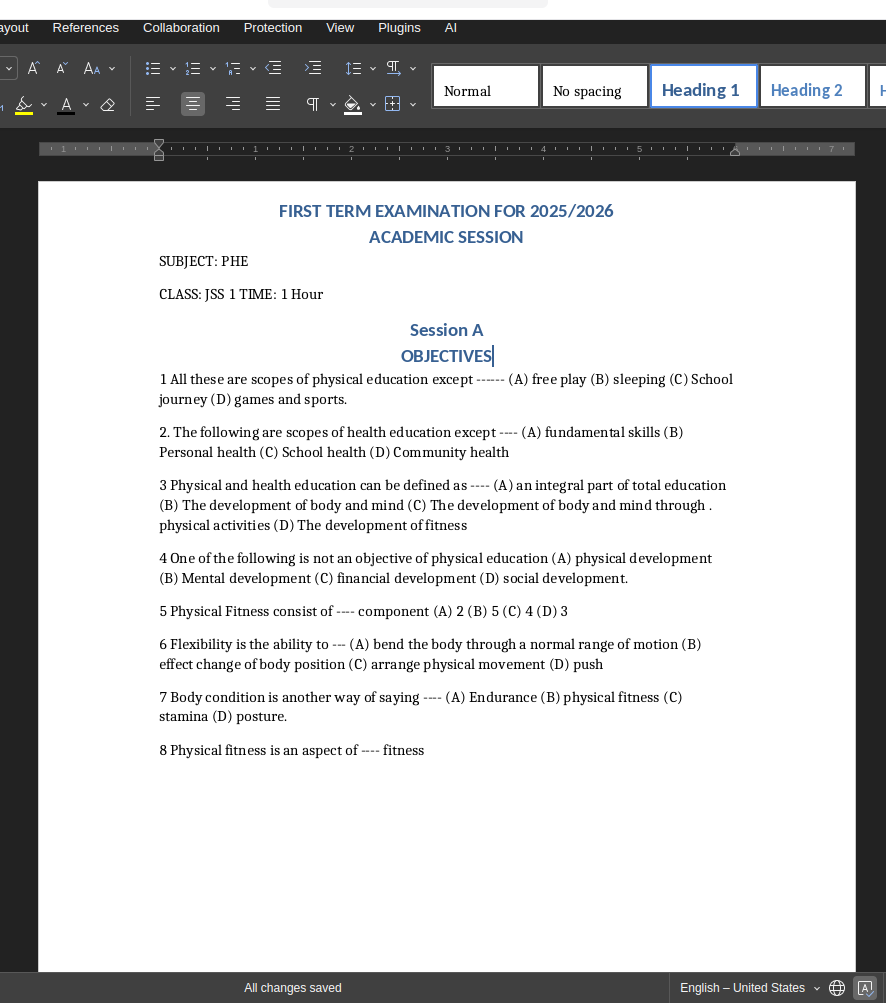
Real cursive sample, see exactly how our AI handles connected, flowing script.
Who Converts Cursive to Text?
From family historians digitising old letters to students transcribing notes, cursive conversion saves hours of manual retyping every week.
Old Letters & Family Documents
Convert grandparents' handwritten letters, old diaries, and personal journals into searchable digital text. Preserve family history without paying a professional transcriptionist.
Student Cursive Notes
Many students still write lecture and revision notes in cursive. Photograph your notebook and get fully editable, searchable text within seconds, ready for revision documents and essays.
Historical & Archival Documents
Digitise cursive-written records, estate documents, parish registers, and legal papers. Our AI handles older cursive styles including Victorian longhand and early 20th century script.
Professional Cursive Forms
Field reports, signed intake forms, handwritten invoices, and patient notes written in cursive script, convert them to editable Word or Excel in one step.
Cursive OCR: How Methods Stack Up
Cursive is where generic tools collapse. Here's why purpose-built AI is the only reliable option.
| Method | Speed | Accuracy on Cursive | Cost |
|---|---|---|---|
| Manual retyping | 60+ min/page | 100% (error-prone) | Your time |
| Google Lens / Adobe OCR | Instant | 30–55% on cursive | Free & Paid |
| NoteOCR Cursive Converter | Under 30 seconds | 90–98% on cursive | Free to try |
Why Our Cursive Converter Is Different
Cursive-first AI, not a printed-text OCR tool with a cursive patch bolted on.
Reads Connected Letters Natively
Standard OCR segments individual characters before reading them. Cursive breaks that entirely, letters connect and overlap. Our AI reads whole words and lines at once, the same way a human eye does, making connected script readable where other tools give up.
Handles Loops, Slant & Variation
Every person's cursive is unique, different loop sizes, slant angles, and letter spacing. Our neural network was trained on millions of real cursive samples across dozens of writing styles, so it generalises to handwriting it has never seen before.
Exports to Word, Excel & Text
Converted cursive text isn't dumped as an unformatted paragraph. We reconstruct document layout, paragraphs, lists, tables, and export directly to .docx, .xlsx, or plain .txt depending on what you need.
Why Cursive Is So Hard for OCR, And How We Solve It
Standard OCR was engineered for printed text. Every assumption it makes, uniform character shapes, clear gaps between letters, consistent spacing, breaks completely with cursive writing. Cursive letters blend together. The same letter looks completely different depending on what comes before and after it. Slant varies line by line. Loops and tails cross other letters. Our AI takes a fundamentally different approach: instead of trying to isolate individual characters, it reads entire words and lines as visual patterns, the same strategy a fluent human reader uses when encountering joined-up script they've never seen before.
What Our AI Handles
- Fully connected cursive where no letters are separated
- Mixed cursive and print on the same page
- Varying slant, right-leaning, left-leaning, and upright
- Decorative and personalised letterforms
- Older Victorian and early 20th century cursive styles
Tips for Best Cursive Conversion
- Use natural daylight, avoid flash which flattens ink contrast
- Hold the camera flat above the page, not at an angle
- Ensure dark ink on light paper, avoid shadows across the text
- For very old documents, increase contrast in any photo editor first
- Always review output, even 95% accuracy means occasional corrections on longer pages
Related Tools
Frequently Asked Questions About Cursive to Text Conversion
1. What is a cursive to text converter?
A cursive to text converter is an AI tool that reads photographs or scans of cursive handwriting and converts the content into typed, editable digital text. Unlike standard OCR software which was built for printed fonts, a cursive converter uses neural networks trained specifically on joined-up and flowing script to interpret the connected letter shapes that define cursive writing.
2. How accurate is AI cursive handwriting recognition?
NoteOCR achieves 90–98% accuracy on clear, well-lit cursive handwriting. Very stylised personal cursive or heavily degraded paper may fall closer to 80–85%. For comparison, general-purpose OCR tools like Google Lens average only 30–55% on cursive because they were not designed for connected script. Always review the output before using it in critical documents.
3. Does it work on joined-up writing?
Yes. Joined-up writing and cursive are the same thing , letters that connect without lifting the pen. This is precisely what our AI was trained on. Whether you call it joined-up writing, running writing, script, or longhand, our converter handles it. It works equally well on fully connected cursive and semi-cursive styles where some letters separate.
4. Can it convert old-fashioned or Victorian cursive handwriting?
Yes, with some caveats. Our AI handles older cursive styles including Victorian copperplate, early 20th century longhand, and formal script from historical letters and documents. Very archaic styles , 17th or 18th century secretary hand or pre-modern scripts , may have lower accuracy. For post-1850 cursive, performance is consistently high. We recommend uploading a sample page to test before processing a full archive.
5. What if my cursive is very personal or unique?
Personal cursive, where letters are highly stylised and specific to one writer is the hardest case for any AI. Our model generalises well because it was trained on millions of different handwriting styles, not just standard school cursive. Accuracy on highly personalised writing typically sits at 80–90%. The more consistent the writing style across a page, the better the result.
6. Can I convert cursive to text without downloading an app?
Yes. NoteOCR runs entirely in your browser. No app, no software installation, no plugin. Upload your cursive image and get converted text immediately. Works on Chrome, Safari, Firefox, and Edge on desktop and mobile devices.
7. Can I convert cursive from a phone photo?
Absolutely. Take a photo of your cursive notes or letter with your phone camera and upload it directly. Our AI handles perspective correction, contrast enhancement, and noise removal automatically. For best results, photograph in daylight with the phone held flat above the page rather than at an angle.
8. Is there a free cursive to text converter online?
Yes. NoteOCR is free to try. upload your cursive handwriting and get the converted text without creating an account. For higher volume conversions, Word and Excel export, and batch processing, paid plans are available. But the core cursive recognition is free to test on any image.
9. Can I export converted cursive text to Word?
Yes. Converted cursive text can be exported as a Microsoft Word .docx file with paragraph structure and formatting preserved. This is available on Student plan and above. Plain text export is available on the free tier. Excel export is available when your cursive content contains tables or structured data.
10. Is cursive harder to convert than printed handwriting?
Yes. cursive is significantly harder for AI than print. Printed handwriting has discrete, separated letters that are easier to segment and match. Cursive letters connect, overlap, and change shape depending on neighbouring letters. Our cursive converter was built specifically for this challenge, which is why it outperforms general handwriting tools on connected script.
11. Can I use it to convert handwritten letters and journals to text?
Yes. this is one of the most popular use cases. Upload a photograph of a handwritten letter, diary entry, or personal journal and get the full text in editable form within seconds. Many users digitise decades of family correspondence for archiving and sharing. The converter preserves paragraph breaks and page structure so the digital version reads naturally.
12. Which languages does the cursive converter support?
NoteOCR supports cursive recognition in 30+ languages including English, Spanish, French, German, Portuguese, Italian, and Dutch. Romance languages which have particularly rich cursive traditions perform especially well. Arabic, Urdu, and Persian calligraphic script are also supported. For languages with non-Latin scripts, accuracy varies by image quality and script complexity.
13. Does it work on historical cursive documents and records?
Yes, for modern historical documents roughly 1850 onwards accuracy is consistently high. Our AI handles faded ink, aged paper, and older cursive letterforms well. For earlier documents and specialised historical scripts, we recommend testing a sample first. The converter is used regularly for family history research, estate records, and parish registers.
14. How does the cursive to text converter actually work?
When you upload a cursive image, our AI runs three stages. First, image preprocessing , correcting skew, enhancing contrast, removing noise. Second, layout analysis , identifying lines, paragraphs, and document structure. Third, cursive recognition, a neural network reads each line of text as a visual sequence, using context from surrounding words to interpret ambiguous joined letters. The result is assembled back into a structured document preserving your original layout.
15. Is my cursive content kept private?
Yes. All uploads are encrypted via SSL during transfer. Your images are processed in isolated secure containers and permanently deleted within 24 hours. We never use uploaded content to train our models and never share it with third parties. Personal letters, journals, and private documents are handled with full confidentiality.
16. Is NoteOCR better than Google Docs or Google Lens for cursive?
Significantly better for cursive specifically. Google Lens and Google Docs voice typing were designed for printed text and structured documents. On cursive handwriting, Google's tools typically achieve 30–55% accuracy meaning nearly half the words come out wrong. NoteOCR was purpose-built for handwriting including cursive and achieves 90–98% on the same documents. It also exports to Word and Excel, which Google Lens cannot do.
17. Can I convert multiple pages of cursive at once?
Batch processing is available on Professional and Power User plans. Free and Student plan users process one page at a time. For large projects full diaries, multi-letter archives, or bulk document digitisation the Power User plan includes unlimited batch uploads with concurrent processing so you can convert an entire notebook in one session.
18. Does it read copperplate and calligraphy-style cursive?
Yes. Copperplate. the formal, highly decorated cursive used in historic correspondence and official documents are supported. The consistent letter shapes of copperplate actually perform well in our AI compared to messy personal cursive. Ornate calligraphic styles with heavy flourishes may occasionally confuse the recogniser, but standard copperplate from the 19th and early 20th centuries reads reliably.
19. How do I improve cursive conversion accuracy?
Image quality is the single biggest factor. Photograph in bright, even daylight , natural light is better than flash. Hold your camera or phone flat above the page to avoid keystoning. Make sure the ink contrasts clearly against the paper. For old or faded documents, increase the contrast using any free photo editor before uploading. Scanning at 300 DPI or higher also significantly improves results over phone photos.
Ready to Convert Your Cursive Writing?
Upload any cursive image, letters, journals, notes, forms and get clean, editable text in under 30 seconds.
Try Cursive to Text Free