Handwriting Recognition That Actually Works.
Upload a photo of any handwritten notes, forms, or documents. Our AI reads the handwriting, including messy cursive writtings and converts it into editable formatted text in seconds.
Upload Handwriting
Upload images of your handwritten notes to convert them into editable Word docs.
Works in your browser. No download, no signup required to try.
Trained on real handwriting , not adapted from a font OCR engine.
Get your recognised text in the format you actually need.
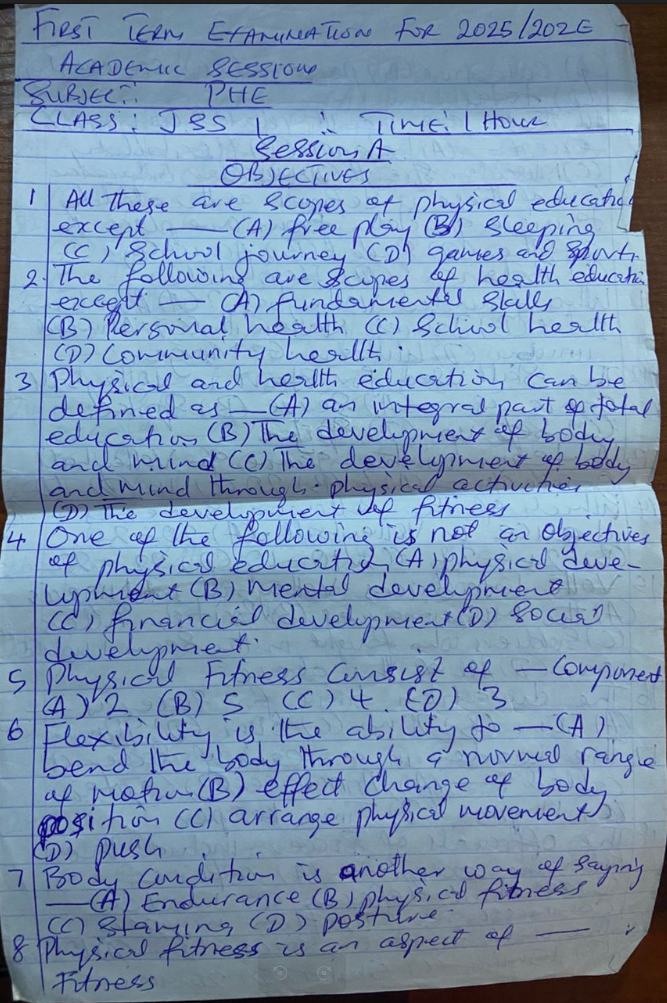
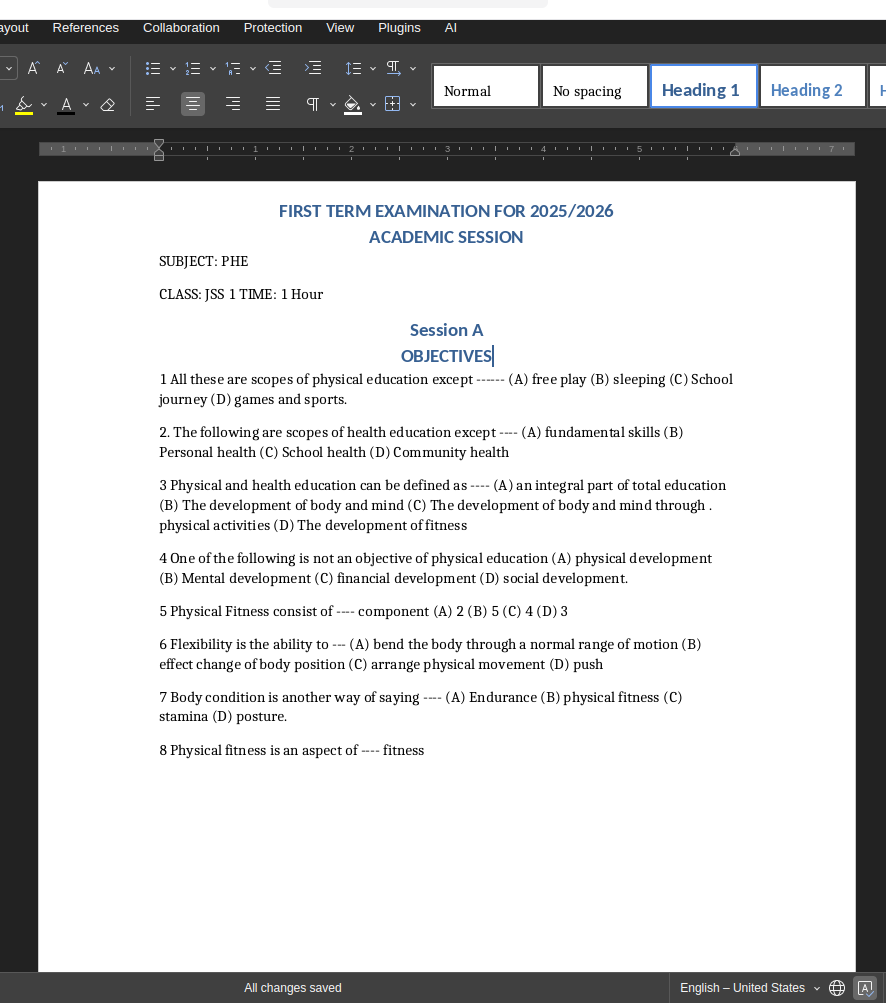
See the Recognition in Action
Real handwriting sample showing what our AI reads versus what comes out.
Who Uses Handwriting Recognition?
From students digitalising notes to businesses processing forms , handwriting recognition saves hours every day.
Students & Lecture Notes
Photograph your notebook after class and get fully searchable, editable text in seconds. No more retyping pages of lecture notes before exams.
Messy & Cursive Handwriting
Our AI is trained specifically on difficult handwriting , rushed scribbles, connected cursive, and mixed print/cursive styles all recognised with high accuracy.
Handwritten Forms & Documents
Digitise patient intake forms, field reports, invoices, and HR records from a phone photo. No scanner needed , your camera is enough.
Old Letters & Journals
Preserve handwritten family letters, personal diaries, and historical documents by converting them into searchable digital text you can share and archive.
Handwriting Recognition: Methods Compared
Why purpose-built AI outperforms general tools every time.
| Method | Speed | Accuracy on Handwriting | Cost |
|---|---|---|---|
| Manual retyping | 60+ min/page | 100% (but error-prone) | Your time |
| Generic OCR (Google Lens, Adobe) | Instant | 40–70% on handwriting | Free & Paid |
| NoteOCR Handwriting Recognition | Under 30 seconds | 95–99% including cursive | Free to try |
Why Our Handwriting Recognition Is Different
Built specifically for handwriting , not adapted from a printed text tool.
Trained on Handwriting, Not Fonts
Generic OCR learns from printed fonts. Our AI was trained exclusively on millions of real handwriting samples , print, cursive, mixed styles, rushed notes, and everything in between.
Reads Messy & Cursive Writing
Connected letters, varying slant, inconsistent sizing , the exact things that break standard OCR. Our neural network handles them the same way a human reader does: using context to fill gaps.
Outputs You Can Actually Use
Recognised text is not just dumped as a plain paragraph. We reconstruct layout, preserve lists and headers, and export to Word, Excel, or plain text depending on what you need.
How Handwriting Recognition Works
Standard OCR technology was built for printed text , uniform fonts with predictable letter shapes. Handwriting breaks every assumption that makes standard OCR work. Every person writes differently. Letters connect, overlap, vary in size and slant. Our AI uses a completely different approach: neural networks trained on millions of handwriting samples that learn to read the way a human does , recognising patterns across whole words and lines, not individual characters.
What Our AI Detects
- Print and cursive handwriting , including connected and overlapping letters
- Messy, rushed, and inconsistent writing styles
- Mixed print and cursive on the same page
- Crossed-out words and corrections
- Document structure , headers, lists, paragraphs, and table rows
Best Results Tips
- Photograph in good natural light , avoid flash directly on the page
- Hold your phone parallel to the paper, not at an angle
- Ensure ink contrasts clearly against the paper background
- 300 DPI or higher for scanned documents
- Review the output , even 95% accuracy means occasional corrections needed
Related Tools
Frequently Asked Questions About Handwriting Recognition
1. What is handwriting recognition?
Handwriting recognition , also called HTR (Handwritten Text Recognition) , is AI technology that reads handwritten text in images and converts it into digital, editable text. Unlike standard OCR which works on printed fonts, handwriting recognition uses neural networks trained on real handwriting samples to interpret the infinite variation in how people write.
2. How accurate is AI handwriting recognition?
NoteOCR achieves 95–99% accuracy on clear, well-lit handwriting. Messy or heavily cursive handwriting typically falls between 85–92%. For comparison, generic tools like Google Lens average 60–70% accuracy on handwriting. Always review the output before using it for critical documents.
3. Does it work on messy handwriting?
Yes , messy handwriting is specifically what our AI is trained for. Standard OCR tools were designed for clean printed text and fail on anything that deviates from uniform fonts. Our neural network handles rushing, inconsistent sizing, crossed-out words, and varying slant because it learned from millions of real handwriting samples, not fonts.
4. Can it recognise cursive handwriting?
Yes. Cursive is one of the hardest cases for standard OCR because letters connect and overlap, making it impossible to segment individual characters. Our AI reads cursive the same way a human does , by analysing patterns across whole words and lines. It handles connected script, flowing loops, and mixed cursive/print styles.
5. Can I use handwriting recognition without downloading an app?
Yes , NoteOCR runs entirely in your browser. No app download, no software installation, no plugin required. Just open the page, upload your image, and get results. Works on Chrome, Safari, Firefox, and Edge on any device including mobile.
6. Is there free handwriting recognition without signing up?
Yes. You can try NoteOCR free without creating an account. Upload your handwritten image and get the recognised text instantly. For higher volume processing, exporting to Word or Excel, and batch uploads, a paid plan is available , but the core recognition is free to test.
7. Can I do handwriting recognition from a phone photo?
Absolutely. Take a photo of your handwritten notes with your phone camera and upload it directly. Our AI handles the perspective correction, lighting enhancement, and noise removal automatically. For best results, hold your phone parallel to the paper and photograph in daylight rather than using flash.
8. How does handwriting recognition help students?
Students use it to digitise lecture notes after class, making them searchable and shareable. Instead of retyping pages of handwritten notes before an exam, you upload a photo and get editable text in under a minute. You can then search for specific terms, copy sections into essays, and share notes with classmates , all without retyping a single word.
9. How is this different from Google Lens handwriting recognition?
Google Lens is a general-purpose tool primarily optimised for printed text, signs, and product labels. Its handwriting accuracy averages 60–70% because handwriting recognition was not its core design goal. NoteOCR was built specifically for handwriting , trained exclusively on handwritten samples , which is why accuracy reaches 95–99% on the same documents Google Lens struggles with. NoteOCR also reconstructs document structure and exports to Word and Excel, which Google Lens cannot do.
10. Is NoteOCR better than Adobe for handwriting recognition?
For handwriting specifically, yes. Adobe Acrobat's OCR is excellent for printed text and scanned documents but was not designed for handwriting. It regularly misreads cursive and connected script. NoteOCR is purpose-built for handwriting recognition and significantly outperforms Adobe on handwritten content. Adobe also requires a $20/month subscription; NoteOCR is free to try.
11. What file formats does the handwriting recognition accept?
You can upload JPG, JPEG, PNG, and WEBP image files. PDF uploads are supported on paid plans. For multi-page documents, upload each page separately on the free plan. Maximum file size is 25MB per image.
12. What formats can I export the recognised text to?
Recognised text can be exported as plain text (TXT), Microsoft Word document (DOCX), Microsoft Excel spreadsheet (XLSX) if the handwriting contains tables, and PDF. The export format available depends on your plan , TXT is available on the free tier, DOCX and XLSX require a Student plan or above.
13. How does AI handwriting recognition actually work?
Our AI uses convolutional neural networks to analyse your uploaded image. First it preprocesses the image , correcting skew, enhancing contrast, removing noise. Then layout analysis identifies document structure: lines, paragraphs, tables. Finally the neural network reads each line of text, using surrounding words as context to interpret ambiguous characters. The result is reconstructed into a properly formatted document preserving your original structure.
14. Which languages does the handwriting recognition support?
NoteOCR supports 30+ languages including English, Spanish, French, German, Portuguese, Italian, Dutch, and more. For non-Latin scripts including Arabic, Chinese, Japanese, Hindi, and others, recognition is available but accuracy varies by script complexity and image quality.
15. Is my handwritten content private when I upload it?
Yes. All uploads are encrypted via SSL during transfer. Your images are processed in isolated secure containers and permanently deleted within 24 hours. We never use your handwritten content to train our models or share it with third parties. NoteOCR is privacy-first by design.
16. Can it recognise handwriting from old or historical documents?
Yes, with caveats. NoteOCR handles aged paper, faded ink, and older handwriting styles reasonably well. However, very old scripts , 18th century calligraphy, historical German Kurrent, or pre-modern scripts , may have lower accuracy. For modern handwriting (post-1900), performance is consistently high. We recommend testing a sample page on older documents before processing a full archive.
17. Can it read doctors' handwriting?
This is one of the most common use cases , and yes, our AI handles it. Doctor handwriting is notoriously difficult: fast, compressed, often cursive, and full of abbreviations. Our recognition engine was trained on challenging real-world samples including medical notes. Accuracy on doctor handwriting is typically 80–90% , lower than standard handwriting but significantly better than any generic OCR tool.
18. Does it work on whiteboard photos?
Yes. Whiteboard content , typically marker on white background , is actually easier for our AI than paper handwriting because the contrast is high and there is no paper texture interference. Upload a photo of a whiteboard session and the text will be recognised clearly. For best results avoid glare from overhead lights.
19. Can I process multiple handwritten pages at once?
Batch processing is available on Professional and Power User plans. Free and Student plan users process one page at a time. For large archives , notebooks, multi-page forms, or bulk document digitisation , the Power User plan includes unlimited batch uploads with concurrent processing.
20. How can I improve handwriting recognition accuracy?
The single biggest factor is image quality. Photograph in bright, even light , natural daylight is best. Hold your camera parallel to the page, not at an angle. Make sure the entire page fills the frame. Avoid shadows across the text. For scanning, use 300 DPI or higher. If accuracy is still low, try increasing the contrast of the image before uploading using any free photo editor.
Ready to Recognise Your Handwriting?
Join 10,000+ students, researchers, and businesses who've stopped retyping handwritten content.
Try Handwriting Recognition Free