Convertissez n'importe quelle photo en document Word
Transformez les photos de votre smartphone en texte modifiable. Téléversez une photo d'un livre, d'un tableau blanc ou d'une diapositive de présentation, et laissez notre IA créer un fichier Microsoft Word (.docx) formaté en quelques secondes.
Téléversez votre photo
Sélectionnez une photo dans votre pellicule ou sur votre ordinateur. Nous extrairons le texte et générerons un fichier Word formaté.
PhotoToWord.tool_upload_hint
Le texte est extrait, pas juste collé comme une image
Les paragraphes et les sauts de ligne sont recréés
S'ouvre dans MS Word, Google Docs et Pages
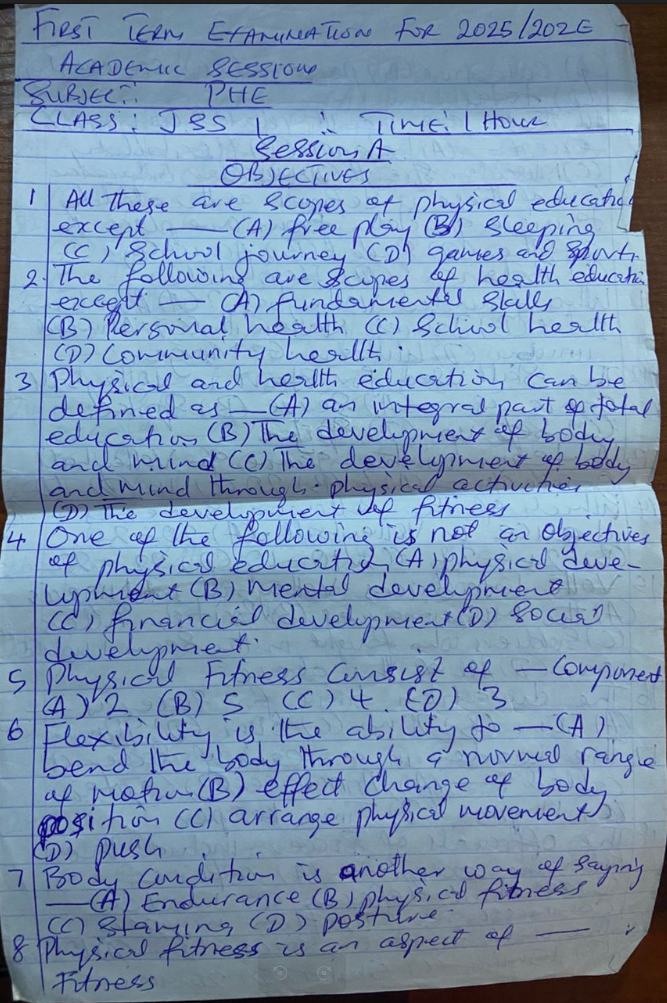
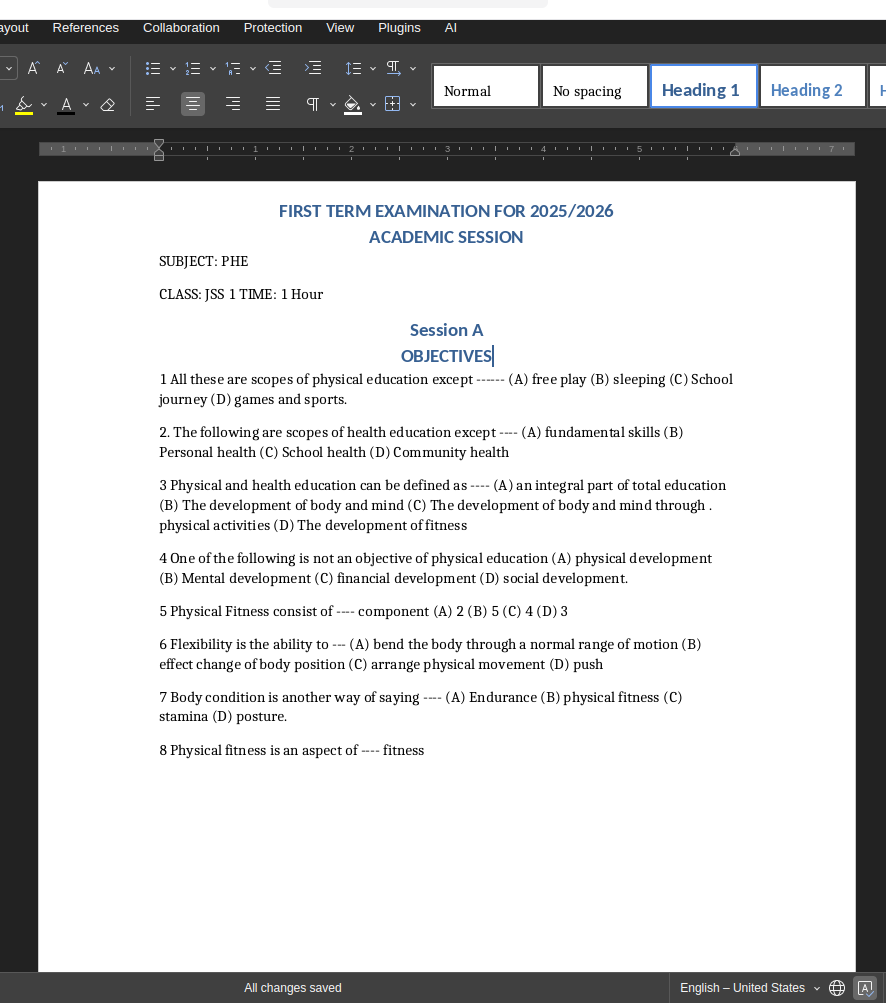
De la pellicule au fichier Word
Découvrez comment nous gérons des photos du monde réel avec des reflets et des arrière-plans encombrés.
Quelles photos pouvez-vous convertir ?
Parfait pour les photos quotidiennes prises en déplacement.
Réunions sur tableau blanc
Vous avez pris une photo du tableau blanc après un brainstorming ? Convertissez directement l'écriture au marqueur en notes de réunion dans Word.
Pages de manuels scolaires
Arrêtez de retaper des citations pour votre dissertation. Prenez une photo de votre livre et extrayez instantanément les paragraphes exacts dont vous avez besoin.
Diapositives de présentation
Vous êtes dans le public et avez photographié une diapositive PowerPoint ? Récupérez le texte de la photo de l'écran dans un document modifiable.
Recettes et Magazines
Sauvegardez une recette physique ou un article de magazine intéressant en prenant une photo et en le transformant en un fichier texte consultable.
Comparaison des extractions de texte photo
Pourquoi NoteOCR est meilleur que de taper manuellement sur le petit clavier d'un téléphone.
| Méthode | Temps | Gère un mauvais éclairage ? | Coût |
|---|---|---|---|
| Taper sur le téléphone | 10-20 minutes | N/A | Votre temps |
| Convertisseurs photo basiques | 1 minute | Échoue avec les reflets | Souvent payant |
| Moteur photo NoteOCR | 15 Secondes | Améliore l'éclairage automatiquement | Essai gratuit |
Conçu pour des photos de la vie réelle
Les photos de smartphone ne sont pas parfaites. Notre IA est conçue pour gérer cela.
Correction de la perspective
Si vous avez pris la photo de la page d'un livre sous un angle étrange, notre moteur aplanit automatiquement l'image et corrige la perspective avant de lire le texte.
Suppression des reflets et des ombres
Les flashs de smartphone et les ombres de la pièce peuvent cacher le texte. Notre IA équilibre l'éclairage de votre image pour garantir une reconnaissance de caractères de haute précision.
Ignore l'arrière-plan
Avez-vous photographié votre bureau ou votre main par accident ? Notre système recadre intelligemment les éléments qui ne sont pas du texte pour se concentrer uniquement sur le document.
Comment nous lisons vos photos
Extraire du texte à partir d'une photo de smartphone est beaucoup plus difficile que de lire un scan numérique à plat. NoteOCR utilise une IA de vision (Vision AI) intelligente pour comprendre la géométrie de votre photo avant de convertir les caractères en un document Word.
Ce que notre IA gère
- Pages incurvées de livres épais
- Photos prises d'écrans d'ordinateur (anti-moiré)
- Écriture manuscrite au marqueur sur tableau blanc
- Photos faiblement éclairées ou pièces sombres
- Différentes polices et tailles de texte sur une seule image
Conseils pour prendre de meilleures photos
- Touchez l'écran de votre téléphone pour faire la mise au point
- Tenez votre téléphone aussi stable que possible
- Essayez d'éviter les ombres projetées par le dessus
- Faites en sorte que le texte remplisse la majeure partie de l'image
- Désactivez le flash si vous photographiez une page brillante
Autres outils documentaires
Image vers Excel
Extrayez des tableaux de données d'images vers des feuilles de calcul
Photo vers Word
Convertissez des photos de votre appareil photo directement en Word
Écriture manuscrite vers Texte
Transcription spécialisée pour cursive et notes
Éditeur en ligne
Modifiez vos documents en toute sécurité dans le navigateur
Foire Aux Questions sur la conversion de photos
1. Comment convertir une photo en document Word ?
Prenez une photo du texte que vous souhaitez extraire, téléversez la photo sur notre outil, et notre IA lira les caractères et vous fournira un fichier Microsoft Word (.docx) entièrement modifiable.
2. Puis-je téléverser des photos directement depuis mon iPhone ou Android ?
Oui ! NoteOCR est très adapté aux mobiles. Vous pouvez accéder à cette page depuis le navigateur de votre smartphone, appuyer sur le bouton de téléversement et sélectionner une image directement dans votre pellicule.
3. Que faire si j'ai pris la photo avec un angle ?
Notre IA de vision inclut la correction de la perspective. Même si votre appareil photo n'était pas parfaitement parallèle à la page, notre système aplanira numériquement l'image pour en extraire le texte avec précision.
4. Cela fonctionne-t-il pour des photos d'écriture manuscrite ?
Oui. Si vous avez pris en photo un tableau blanc, un post-it ou un journal intime, notre IA est spécifiquement entraînée pour reconnaître et transcrire le texte manuscrit en formats Word numériques.
5. Peut-il lire des photos prises d'un écran d'ordinateur ?
Oui. Les photos d'écrans ont souvent des lignes de pixels étranges (effet moiré), mais notre moteur est conçu pour contourner ce bruit visuel et extraire le texte de la diapositive, du site Web ou du document que vous avez photographié.
6. Que faire si la page du livre est incurvée sur la photo ?
Notre analyse avancée de la mise en page peut suivre la courbe de la page d'un livre épais. Elle lit les phrases sans problème et les reconstruit en paragraphes standards et droits dans votre document Word.
7. Le convertisseur photo vers Word est-il gratuit ?
Nous proposons des essais de conversion gratuits afin que vous puissiez tester notre capacité à extraire le texte de vos photos. Pour des lots importants de photos, nous proposons une option professionnelle par paiement unique.
8. Puis-je ouvrir le texte de l'image dans Google Docs ?
Absolument. Le texte est compilé dans un fichier .docx standard, qui est pris en charge nativement par Microsoft Word, Google Docs, Apple Pages et LibreOffice.
9. Les photos que je téléverse sont-elles privées ?
Nous attachons une grande importance à votre vie privée. Vos photos sont téléversées via un chiffrement SSL sécurisé, et les images sont définitivement supprimées de nos serveurs peu après le traitement. Nous n'utilisons pas vos photos pour entraîner notre IA.
10. Cela fonctionnera-t-il si mon image est floue ?
Notre outil fait de son mieux pour rendre les photos plus nettes et les améliorer, mais si le texte est complètement flou ou illisible pour l'œil humain, l'OCR risque de mal lire les mots. Pour de meilleurs résultats, assurez-vous que votre appareil photo a bien fait la mise au point.
Prêt à extraire le texte de votre photo ?
Téléversez votre photo directement depuis votre téléphone ou votre ordinateur.
Téléverser une photo maintenant