
Handschriftliche Tabellen in Excel-Tabellen umwandeln
Sparen Sie sich das manuelle Abtippen. Unsere KI erkennt Zeilen, Spalten und Zellgrenzen in Ihren handschriftlichen Notizen – auch ohne Linien – und exportiert formatierte .xlsx-Dateien.
Laden Sie Ihre handschriftliche Tabelle hoch
Unterstützt Kassenbücher, Inventarlisten und Notenbücher. Funktioniert mit und ohne Linien.
Ein Bild pro kostenloser Konvertierung
Funktioniert auch bei Tabellen ohne gezeichnete Linien
Optimiert für Zahlen und Finanzdaten
Kompatibel mit Excel, Google Sheets und Datenbanken
Überzeugen Sie sich selbst
Echte Konvertierung mit erhaltener Struktur und hoher numerischer Präzision
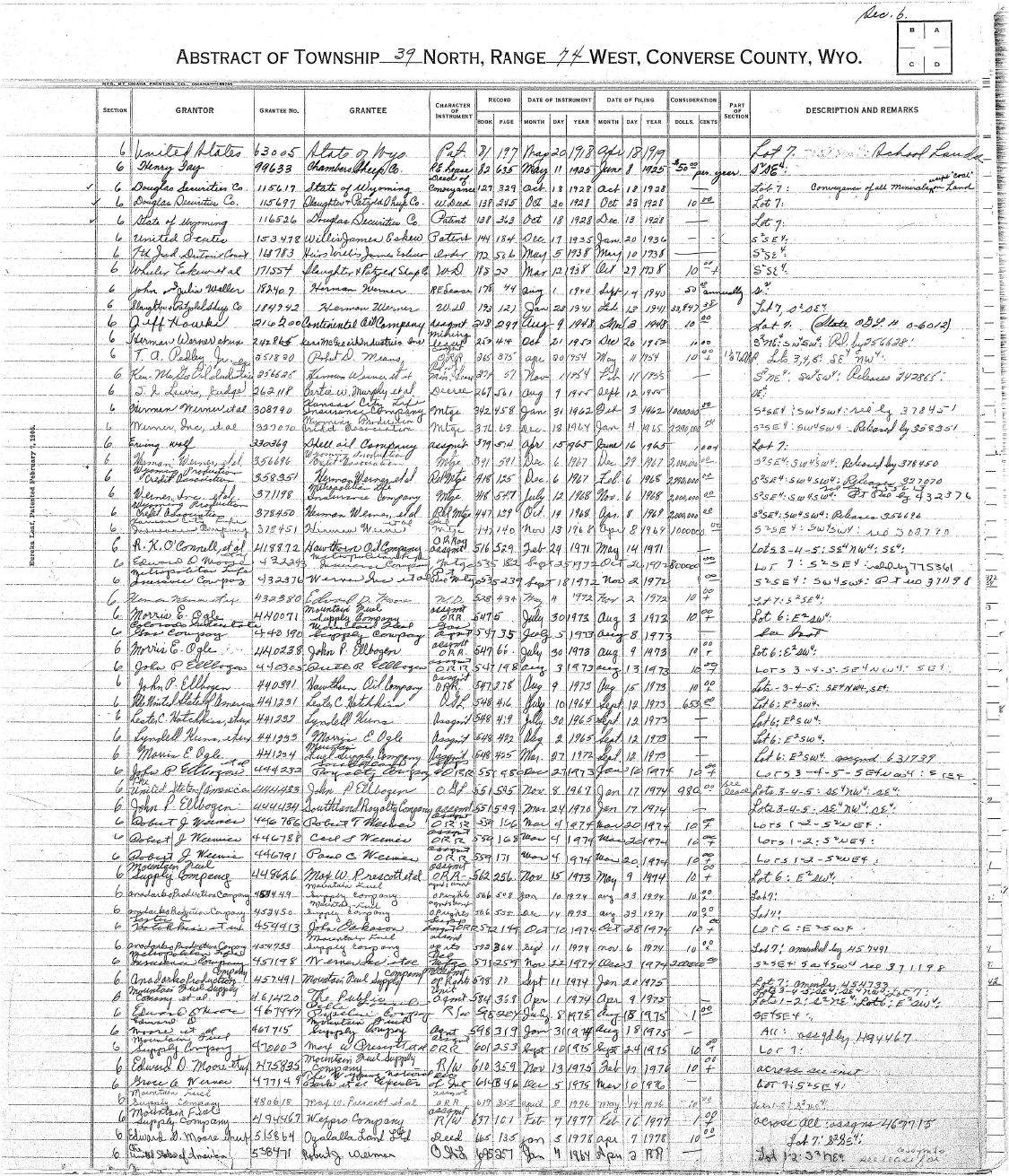
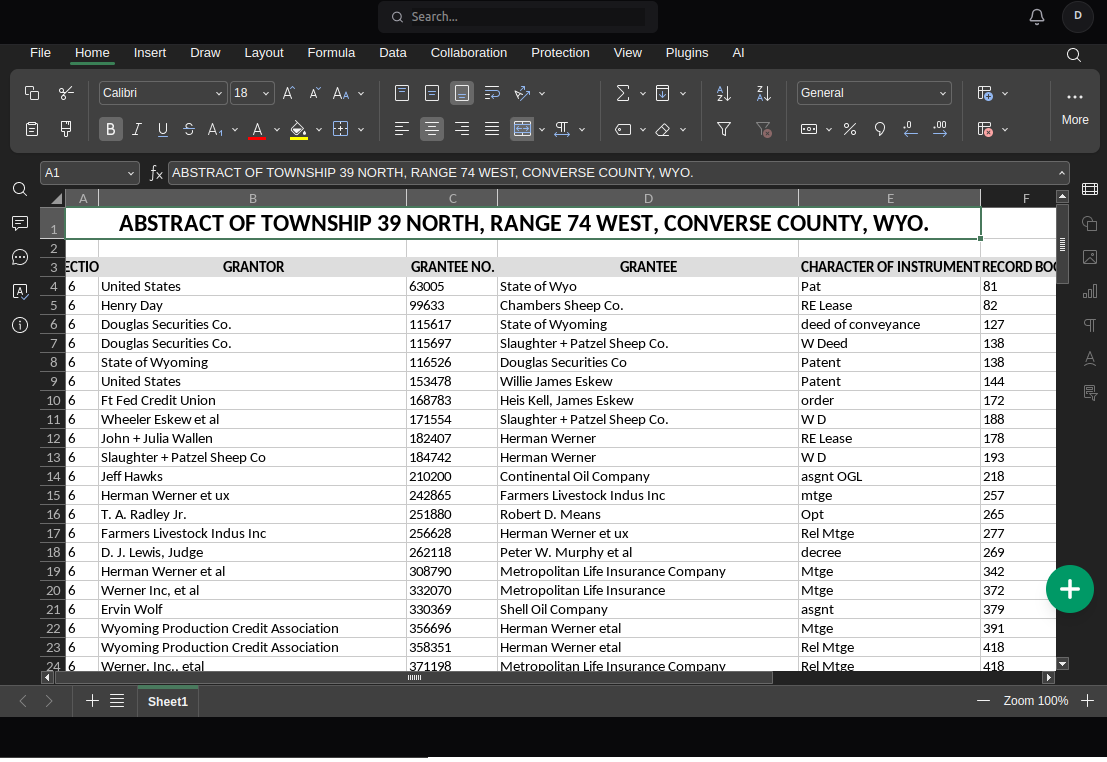
Wer nutzt die Handschrift-zu-Excel-Konvertierung?
Von Steuerbüros bis hin zu Lehrkräften – täglich werden tausende Tabellen digitalisiert
Buchhaltung & Buchführung
Wandeln Sie handschriftliche Kassenbücher, Spesenberichte und Belege in sortierbare Excel-Dateien für die Steuererklärung um.
Lagerverwaltung
Digitalisieren Sie Bestandslisten, Produktlisten und Lagerprotokolle. Ideal für kleine Unternehmen mit Papierlisten.
Lehrkräfte & Notenverwaltung
Verwandeln Sie handschriftliche Notenlisten und Klassenbücher in formatierte Tabellen für Zeugnisse und Fortschrittsberichte.
Forschung & Datenerfassung
Konvertieren Sie Feldnotizen, Umfrageergebnisse und Labordaten in analysierbare Datensätze für Statistiksoftware.
Handschriftliche Tabelle zu Excel: Methoden im Vergleich
Warum NoteOCR im Vergleich zur manuellen Eingabe Stunden spart
| Methode | Zeitaufwand | Genauigkeit | Kosten |
|---|---|---|---|
| Manuelles Abtippen | 45 Minuten | 95% (menschliche Fehler) | 15 €/Std. Lohnkosten |
| Standard-OCR | 10 Minuten | 50% (Strukturverlust) | Kostenlos - 20 € |
| NoteOCR Tabellen | 2 Minuten | 98% Struktur erhalten | 8 € / 100 Seiten |
Warum unsere Tabellen-OCR anders ist
Speziell für handschriftliche Datentabellen entwickelt
Intelligente Rastererkennung
Unsere KI identifiziert Tabellenstrukturen auch ohne sichtbare Linien. Sie erkennt implizite Spalten, Textausrichtungen und Hierarchien.
Optimiert für Zahlen
Höchste Genauigkeit für Finanzdaten. Konvertieren Sie Kassenbücher, Rechnungen und Inventuren unter Beibehaltung der Zahlenformate.
Export nach Excel oder CSV
Laden Sie Ihre Daten als Microsoft Excel (.xlsx) mit Zellformatierung herunter oder exportieren Sie als CSV für Google Sheets und Datenbanken.
Wie die Rastererkennung funktioniert
Die meisten OCR-Tools behandeln Tabellen als Fließtext, was Zellbeziehungen zerstört. Die KI von NoteOCR analysiert räumliche Positionen und Ausrichtungsmuster, um die exakte Struktur – einschließlich Header und verbundener Zellen – zu rekonstruieren.
Was wir erkennen
- Zellgrenzen ohne gezeichnete Linien
- Spaltenüberschriften und Hierarchien
- Verbundene Zellen über mehrere Spalten
- Währungssymbole und Dezimalstellen
- Tabellen auf kariertem oder blanko Papier
Tipps für beste Ergebnisse
- Gute Beleuchtung beim Fotografieren nutzen
- Kamera parallel zur Seite halten
- 300 DPI bei Scans verwenden
- Ganze Tabelle in einem Bild erfassen
- Ergebnis vor kritischer Verwendung prüfen
Verwandte OCR-Tools
Häufig gestellte Fragen zur Tabelle-zu-Excel-Konvertierung
1. Wie konvertiere ich eine handschriftliche Tabelle in Excel?
Laden Sie ein Foto oder einen Scan Ihrer Tabelle bei NoteOCR hoch. Unsere KI erkennt automatisch Struktur und Zellen und wandelt sie in eine .xlsx-Datei um. Der Vorgang dauert ca. 10-30 Sekunden.
2. Kann NoteOCR Schreibschrift in Tabellen lesen?
Ja. Unsere KI ist auf Millionen Proben von Schreibschrift und Druckschrift trainiert. Die Tabellenstruktur bleibt auch bei schwer leserlicher Schrift meist erhalten.
3. Werden mathematische Formeln erkannt?
NoteOCR extrahiert die geschriebenen Werte. Formeln (wie '=SUMME') werden nicht interpretiert, aber die Daten werden so präzise übernommen, dass Sie Formeln in Excel leicht ergänzen können.
4. Ist der Konverter kostenlos?
NoteOCR ist ein Premium-Dienst, aber wir bieten Testphasen an. Es gibt ein kostenloses Kontingent; für hohe Volumina bieten wir faire Einmalzahlungen ohne Abo an.
5. Was, wenn meine Tabelle keine Linien hat?
NoteOCR erkennt Strukturen durch Textabstände und Ausrichtungen. Das funktioniert hervorragend auch auf blanko Notizpapier.
6. Kann ich alte Buchhaltungs-Kassenbücher konvertieren?
Absolut. NoteOCR ist für Finanzdokumente mit Spalten wie Datum, Soll und Haben optimiert.
7. Wie genau sind Zahlen im Vergleich zu Text?
Die Genauigkeit bei Zahlen liegt bei ca. 99%, da die KI speziell auf Ziffern und Währungssymbole trainiert ist. Text liegt im Schnitt bei 92-95%.
8. Kann ich mehrere Tabellen gleichzeitig konvertieren?
Aktuell erfolgt der Upload einzeln. Für Stapelverarbeitung (z.B. 50-seitige Bücher) kontaktieren Sie uns bitte für unsere API-Lösungen.
9. Was ist der Unterschied zwischen Excel- und CSV-Export?
Excel (.xlsx) behält Formatierungen bei. CSV ist reiner Text für Datenbanken oder Python, verliert aber die optische Formatierung.
10. Kann ich die Tabelle nach der Konvertierung bearbeiten?
Ja. Die Datei ist eine Standard-Excel-Datei. Sie können alle Werte korrigieren, formatieren oder Formeln hinzufügen.
11. Funktioniert es besser auf kariertem oder blanko Papier?
Beides funktioniert gut. Karos können der KI helfen, Spalten noch präziser zu trennen, aber unser Algorithmus ist auch für blanko Papier optimiert.
12. Werden verbundene Zellen erkannt?
Die KI versucht, verbundene Zellen (z.B. zentrierte Überschriften) zu erkennen. Komplexe Verschachtelungen müssen eventuell in Excel kurz nachbearbeitet werden.
13. Wie erhalte ich die besten Ergebnisse?
Achten Sie auf: (1) Gute Beleuchtung, (2) Parallele Kameraführung, (3) Leserliche Schrift und (4) Erfassung der gesamten Tabelle in einem Bild.
14. Sind meine Finanzdaten sicher?
Ja. Alle Uploads sind SSL-verschlüsselt. Bilder werden nach der Verarbeitung innerhalb von 24 Stunden gelöscht. Datenschutz hat bei uns Priorität.
15. Warum nicht einfach manuell abtippen?
Manuelles Tippen dauert oft 30-60 Minuten und ist fehleranfällig. NoteOCR erledigt das in 2 Minuten mit 98% Genauigkeit.
Bereit, das manuelle Abtippen zu beenden?
Schließen Sie sich über 10.000 Nutzern an, die Tabellen mit NoteOCR digitalisieren
Tabelle jetzt konvertieren